NREGA Attendance: Daily NMMS Tracking & Muster Roll Verification
To verify your worksite check-ins and ensure correct wage credit, checking your nrega attendance regularly is essential. The payment calculation is based strictly on daily database logs. If your check-in is missing or fails to sync, the system records a zero. This guide explains how to check your logs on the official portal, monitor worksite registers, and resolve nrega attendance discrepancies to avoid payment delays.
Checking daily reports online guards against app glitches and errors. By tracking your work history, you ensure full credit under rural employment guidelines. Below, we break down the rules of worksite registration and list the step-by-step instructions to search the public database without requiring administrative credentials or logins.
[Hide]
- 1.Why Verifying Daily NREGA Attendance Online Matters
- 2.How to Check NREGA Attendance Online Daily
- 2.1.How can I see my NREGA photo? / मनरेगा फोटो कैसे देखें?
- 3.Understanding NREGA Muster Rolls and R2 Reports
- 3.1.How to check NREGA muster roll? / मस्टर रोल कैसे चेक करें?
- 4.The National Mobile Monitoring System (NMMS) App Rules
- 4.1.How to Download the NMMS App & Find the Official Link
- 4.2.NREGA NMMS Registration Process
- 4.3.Is manual NREGA attendance still valid? / क्या मैन्युअल हाजिरी मान्य है?
- 5.Visual NREGA Attendance Tracking Flowchart
- 6.Common Technical Issues and Data Synchronization Failures
- 7.How to Resolve NREGA Attendance Discrepancies and Errors
- 8.State-Wise Daily Wage Rates and NREGA Attendance Payouts
- 8.1.Top Searched State NREGA Attendance Portals
- 8.2.NREGA Wage & Payment Risk Calculator
- 9.State Administration and Chhattisgarh Operations
- 10.NREGA Attendance Verified? Here is Your Next Step
- 11.Frequently Asked Questions
Why Verifying Daily NREGA Attendance Online Matters
Clerical errors during check-in cause frequent payment delays. Unlike physical rolls, digital records are processed faster but depend on network syncs. Checking your logs online allows you to catch errors while the muster roll is open, letting you resolve discrepancies before the Fund Transfer Order (FTO) is generated.
Wage calculation is automated: state daily wage rates are multiplied by the present days in the database. If a supervisor misses a check-in or photo upload, your payout is cut. Regular verification protects your legal right to receive full compensation for manual labor within 15 days of a work cycle.
Official Portal Access: You do not need to register an account or obtain special credentials to check daily NREGA attendance sheets. The Ministry of Rural Development provides public access to all worksite logs on the official website at nrega.nic.in. For a general overview of other services, you can visit our homepage for more resources.
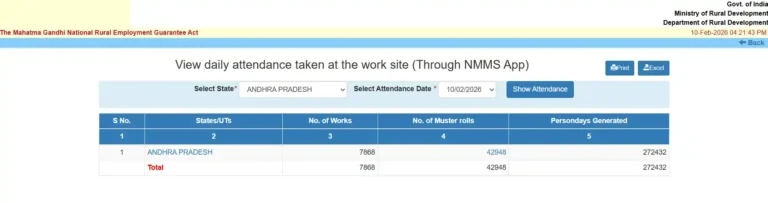
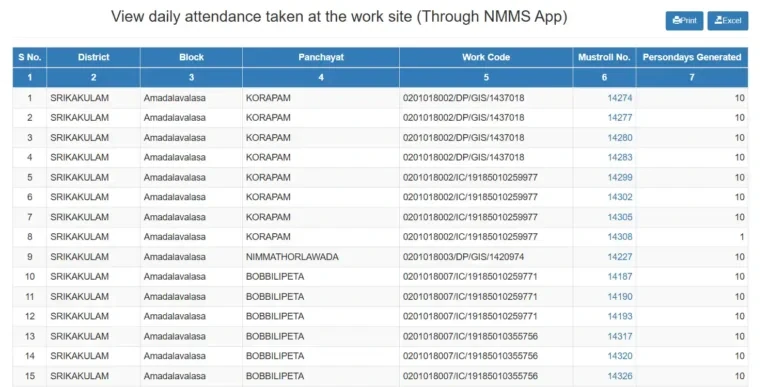
How to Check NREGA Attendance Online (5-Step Guide)
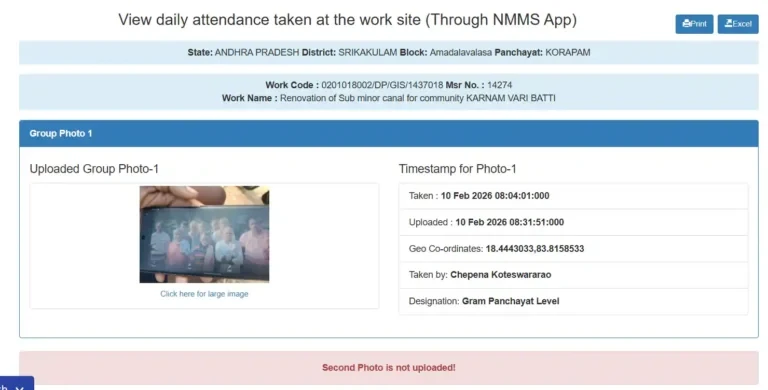
To check your daily worksite presence logs and verify uploaded photographs, follow this simple step-by-step guide. We have matched each step with screenshots from the official government portal to help you navigate the system easily.

Verification Checks to Perform
Pro Tip: If the search query returns a No Record Found message, do not panic. This status usually means the worksite supervisor has not uploaded the morning logs yet, or the internet connection at the remote construction site is temporarily down. Check the database again after the evening shift closes.
How can I see my NREGA photo? / मनरेगा फोटो कैसे देखें?
To view your worksite photo, click the Muster Roll ID on the portal dashboard. The page shows the morning and afternoon group photos captured via the NMMS app. Clicking the preview opens the full-size image, showing details like geo-coordinates, upload timestamp, and supervisor details.
Understanding NREGA Muster Rolls and R2 Reports
A muster roll records worker presence, task type, and calculated wages for a 15-day cycle. In the portal, these sheets are managed under the R2 reports section. Each muster roll has a unique ID generated by block officers when work is allocated.
The local Panchayat generates a muster roll of selected workers when a project starts. The supervisor logs presence daily. Once the cycle ends, the sheet is closed, preventing further edits. Block officers verify the closed roll to calculate wages and generate the FTO. You must report errors before the roll closes at the end of the cycle.
Critical Timing Constraint: Once a muster roll is officially closed and uploaded to the MIS database, local supervisors and Panchayat heads lose the technical capability to modify the NREGA attendance sheets. All corrections must be submitted and processed while the roll is still in open status.
How to check NREGA muster roll? / मस्टर रोल कैसे चेक करें?
To view muster roll details, visit the R2 Gram Panchayat reports page, select the Muster Roll option, and choose your project category and ID. The system generates a table showing worker names, job card numbers, daily presence status, and total wages. You can export this list as an Excel sheet for records.
The National Mobile Monitoring System (NMMS) App Rules
To prevent proxy attendance and ensure real-time reporting, the Ministry of Rural Development made the National Mobile Monitoring System (NMMS) app mandatory for worksite logs, replacing manual paper registers across all states.
NMMS rules require supervisors to upload two geo-tagged, time-stamped photographs daily: one in the morning (6:00 AM to 11:00 AM) and one in the afternoon (2:00 PM to 5:00 PM). Photos must show all workers clearly. The app uses mobile GPS coordinates; uploads from outside the worksite boundary are rejected, marking the group absent.
How to Download the NMMS App & Find the Official Link
Download the official NMMS app directly from the download section of nrega.nic.in. Enable installation from unknown sources in your device settings to install the android app file. Avoid third-party app stores to prevent data leaks.
NREGA NMMS Registration Process
Supervisor registration is managed exclusively by block administrators. GRS submits the supervisor’s details to the block, which registers the number and generates login credentials. Once logged in, supervisors can download muster rolls and start logging presence.
Is manual NREGA attendance still valid? / क्या मैन्युअल हाजिरी मान्य है?
Manual paper-based logs are no longer valid for regular worksites. However, if NMMS fails due to server outages or deep forest offline zones, manual logs are permitted. The supervisor must obtain a written BDO exemption to log attendance on paper, which is later uploaded as an exempted muster roll.
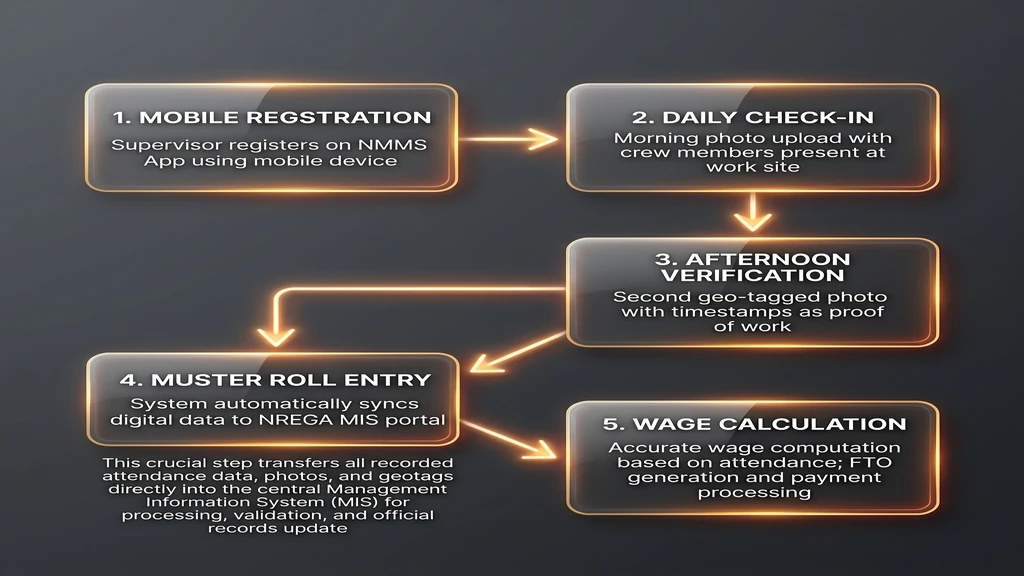
Visual NREGA Attendance Tracking Flowchart
Visualizing the digital reporting pipeline helps clarify how supervisor activity links directly to bank payouts. Review the workflow stages below to understand the technical validation pipeline.
Common Technical Issues and Data Synchronization Failures
Note: NMMS photo uploads may experience delays today due to the new VB-G RAM G database transition.
NMMS depends heavily on network stability. In remote worksites with poor cellular connectivity, offline logs are saved locally. Supervisors must travel to a coverage zone to upload them. If logs are not synced within the 24-hour window, the system records an automatic absence for the group.
Other issues include camera glitches, GPS drops, and coordinate mismatches. Cloudy conditions or forest cover block GPS connections, preventing uploads. Delayed database syncs may also show workers as absent even after a successful upload. regular portal checks help catch these errors early.
How to Use an Exempted Muster Roll When the NMMS App Fails
When the NMMS app fails completely due to prolonged cellular network blackout or device malfunction, worksite supervisors (Mates) can request an exempted muster roll. This allows supervisors to log NREGA attendance manually to prevent loss of worker wages. The following video tutorial explains the exact process of uploading daily logs under this system:
How to Resolve NREGA Attendance Discrepancies and Errors
If you check the online portal and discover that you have been marked absent for a day you worked, you must take immediate steps to resolve the discrepancy. Follow this sequence of actions to file a formal correction request:
- Notify Your Worksite Supervisor: Speak to your Mate immediately. Ask them to verify the daily log on their NMMS app to confirm if the photo was uploaded successfully or if the local database shows a sync error.
- Consult the Gram Rozgar Sahayak (GRS): Visit your local Gram Panchayat office and consult the GRS. They have administrative access to the Gram Panchayat portal and can check the status of the specific Muster Roll ID. If the muster roll is still open, the GRS can submit a technical correction request.
- File a BDO Dispute: If the muster roll is closed, submit a written complaint to the Block Development Officer with your job card copy, Muster Roll ID, and work proof. The BDO can issue manual override approvals after verification.
- Escalate to the Ombudsman: If block officials fail to act, escalate the dispute to the District Ombudsman. They can investigate, review records, order site visits, and penalize officials for wage withholding.
State-Wise Daily Wage Rates and NREGA Attendance Payouts
Daily wage rates are revised annually to match state living costs. Because your payout depends on your present days, tracking your NREGA attendance is essential to estimate earnings. The table below lists rates and expected 15-day payouts.
| State / Union Territory | Daily Wage Rate (2026-27) | Expected 15-Day Payout |
|---|---|---|
| Haryana | ₹374 | ₹5,610 |
| Karnataka | ₹349 | ₹5,235 |
| Kerala | ₹333 | ₹4,995 |
| Tamil Nadu | ₹319 | ₹4,785 |
| Andhra Pradesh | ₹300 | ₹4,500 |
| Rajasthan | ₹266 | ₹3,990 |
| West Bengal | ₹249 | ₹3,735 |
| Bihar | ₹245 | ₹3,675 |
| Uttar Pradesh | ₹237 | ₹3,555 |
When reviewing your bank account statement, make sure the credited amount matches this calculation. If there is a shortfall, it is usually because you were marked absent for some days during the work cycle. By matching your bank credit against your online NREGA attendance log, you can identify exactly which day was missed and locate the corresponding Muster Roll ID to file a claim.
Top Searched State NREGA Attendance Portals
States like Rajasthan, UP, Bihar, and AP maintain dedicated portals that display NREGA attendance sheets in regional languages. These local portals load much faster than the national site, saving time during peak server traffic hours.
NREGA Wage & Payment Risk Calculator
Wages are calculated by multiplying rates by present days. However, delays occur due to sync issues or bank mismatch. A wage risk calculator helps identify transaction security by analyzing Aadhaar status and daily database sync times.
NREGA Attendance & Payment Risk Calculator
Estimate your total earnings and check your FTO payment risk instantly.
Your attendance is fully updated via NMMS. Payment will be credited within 15 days.
ment will be credited within 15 days.”;}else if(a===”medium”){b.textContent=”MEDIUM RISK”;p.innerHTML=”Warning: Partial attendance missing. Payment may be delayed or reduced.”;}else{b.textContent=”HIGH RISK”;p.innerHTML=”Critical: No attendance recorded. FTO will not be generated.”;}}
State Administration and Chhattisgarh Operations
Each state government administers the program locally. For example, Chhattisgarh runs operations via the Panchayat and Rural Development Department of Chhattisgarh, which manages regional budgets, block officers, and database syncs.
For Chhattisgarh workers, the local office provides tools to verify worksite registers and track materials. To check local details or submit grievances, visit the official portal of the Panchayat and Rural Development Department of Chhattisgarh.
Workers can also raise concerns during social audits. These public village forums review work logs, expenditures, and muster rolls, providing a direct channel to resolve incorrect NREGA attendance markings or delayed payouts.
NREGA Attendance Verified? Here is Your Next Step
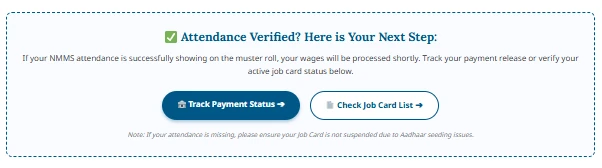
Once your daily NREGA attendance is verified, the next step is monitoring the FTO generation. Block officers verify workdays from closed rolls to generate a digital FTO, which is routed to your Aadhaar-linked bank account.
Frequently Asked Questions
How to check NREGA Attendance online? (नरेगा अटेंडेंस कैसे चेक करें?)
You can check it online by visiting nrega.nic.in, completing the captcha, selecting your state and current financial year, and then navigating to the R6 Work-Wise Daily NREGA Attendance Reports page for your Gram Panchayat.
What is the time for NMMS NREGA attendance?
NREGA attendance is recorded twice daily. The first photograph is captured in the morning between 6:00 AM and 11:00 AM, and the second photograph is captured in the afternoon between 2:00 PM and 5:00 PM.
Can I check my NREGA attendance without a Job Card?
You need your Job Card number to find your name in the detailed Panchayat NREGA attendance sheets. However, you can search for active project codes and overall worksite counts without a job card.
Why is my NREGA attendance not showing today?
It may be due to mobile network delays in uploading the photos, server maintenance on the central portal, or the supervisor not syncing the offline records. Check again after twenty-four hours.
What should I do if my supervisor refuses to take my photo on the NMMS app?
If your worksite supervisor refuses to record your daily NREGA attendance on the app, report the matter immediately to the Gram Rozgar Sahayak or the Gram Panchayat head. You can also file a written complaint with the Block Programme Officer. Supervisors are legally obligated to mark NREGA attendance for all workers allocated to their muster roll.
Disclaimer: This website is an independent informational portal and is not affiliated with, endorsed by, or associated with the Government of India, the Ministry of Rural Development, or any state administration. The official website of the scheme is nrega.nic.in. For official services and government records, please visit the official website directly.