NREGA Payment Status: Online FTO Tracking & Wage Credits
Checking your wages online is the most effective way to ensure that the work days you logged in the local register are processed correctly. The digital database managed by the Ministry of Rural Development tracks every transaction from muster roll closure to direct bank transfer. If you want to verify your wage transfers, checking the nrega payment allows you to monitor FTO processing, Aadhaar seeding validity, and bank account sync logs. Keeping regular track of these reports ensures you can spot transaction delays early and resolve compliance requirements before they affect your household funds.
To access this information, the central database provides localized reports for every Gram Panchayat. While many workers previously had to rely on local officials to check account details, the online portal at the homepage provides complete transparency. In this guide, we detail how you can check your transaction reports, analyze fund transfer stages, troubleshoot Aadhaar-based payments, and claim legally guaranteed allowances if your wages are delayed.
- 1.How to Check NREGA Payment Status Online (Step-by-Step)
- 2.Understanding the NREGA Payment Process
- 3.Why Your NREGA Payment Might Be Delayed (And How to Fix It)
- 4.What to Do If Your NREGA Payment Fails or is Rejected?
- 5.The Unemployment Allowance Rule
- 6.State-Wise NREGA Payment Details & Trackers (2026-27)
- 7.Impact of VB-G RAM G Transition on FTOs
- 8.Frequently Asked Questions (FAQs)
- 9.Related Guide: Troubleshooting Pending Wages
How to Check NREGA Payment Status Online (Step-by-Step)
The official portal allows citizens to generate regional reports and check payment lists without requiring credentials. We have compiled the complete checking process, matching each step with screenshots from the portal to help you verify your transactions easily. Follow these steps to generate your payment report:
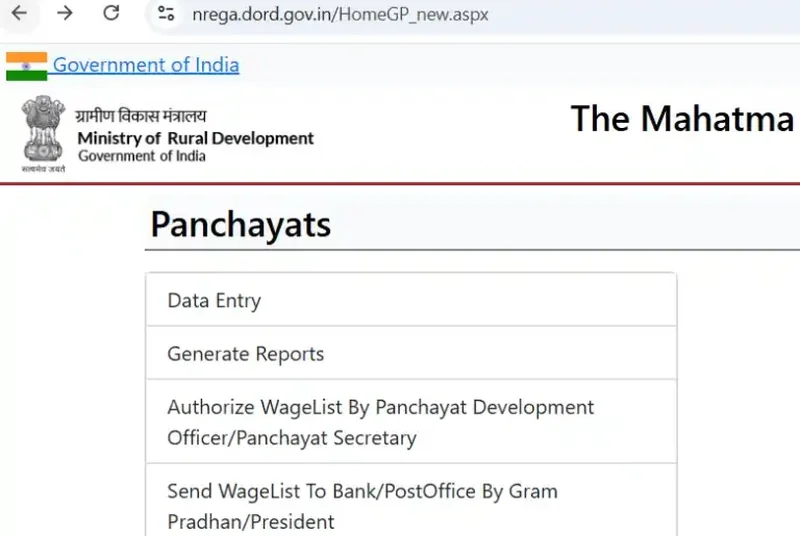
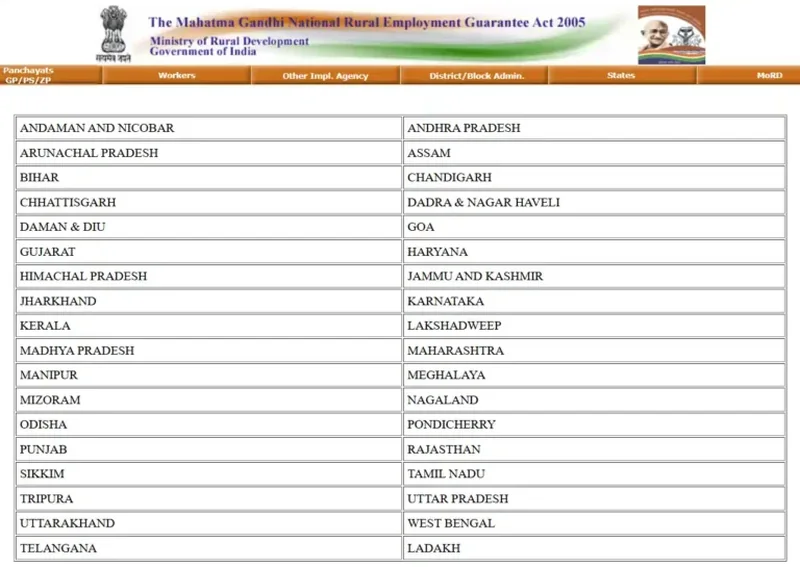
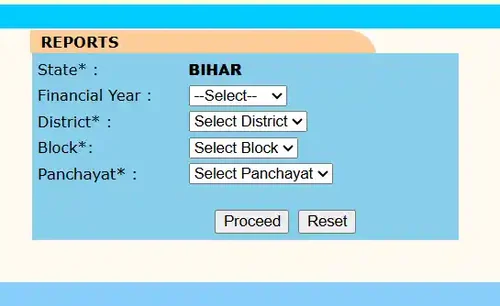
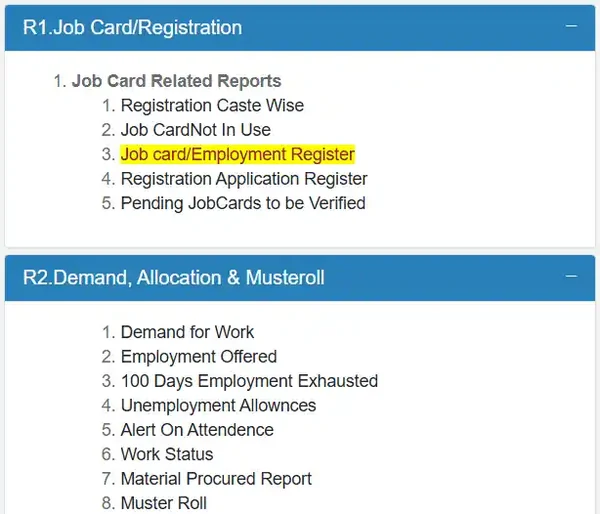
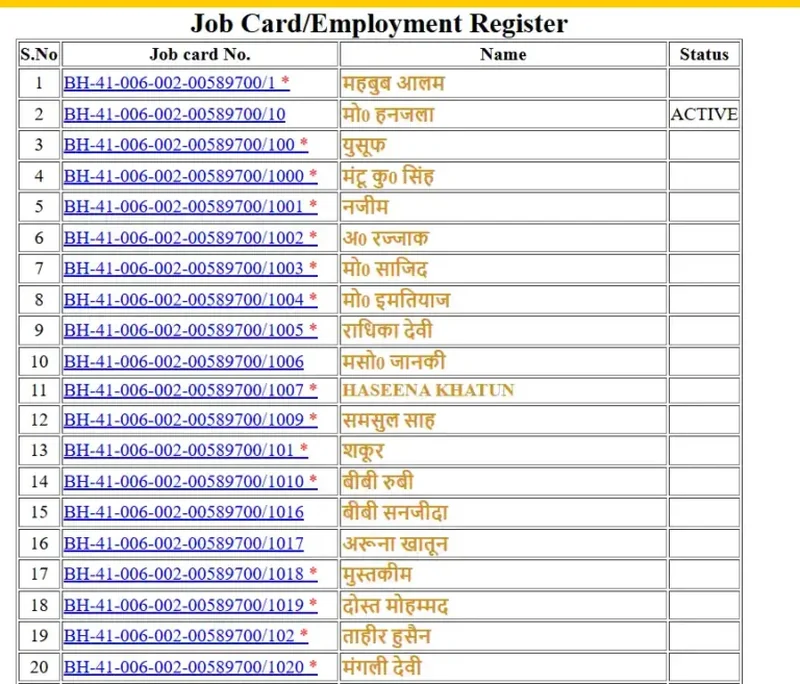
Pro Tip on Tracking: Keep your Job Card Number handy when searching. The regional directories are sorted by registration code, so knowing your state prefix makes it much faster to locate your name in a large village list.
Once you locate your registration entry, you will see a detailed grid representing every work phase completed during the chosen year. This table lists the start and end dates of each employment period, the number of days you spent working, the muster roll number, and the payment status. If the status displays as paid, the table will show the transaction date, the FTO number, and the exact bank branch where the funds were credited. If the status is pending, it indicates the specific administrative stage where the file is currently processing.
Keeping a regular eye on this register ensures that errors in attendance logging do not translate to lost wages for your household. If you want to verify your attendance logs first, you can check NREGA attendance online before querying your payments. Report any discrepancies immediately to the Gram Panchayat development officer to avoid processing delays.
Understanding the NREGA Payment Process
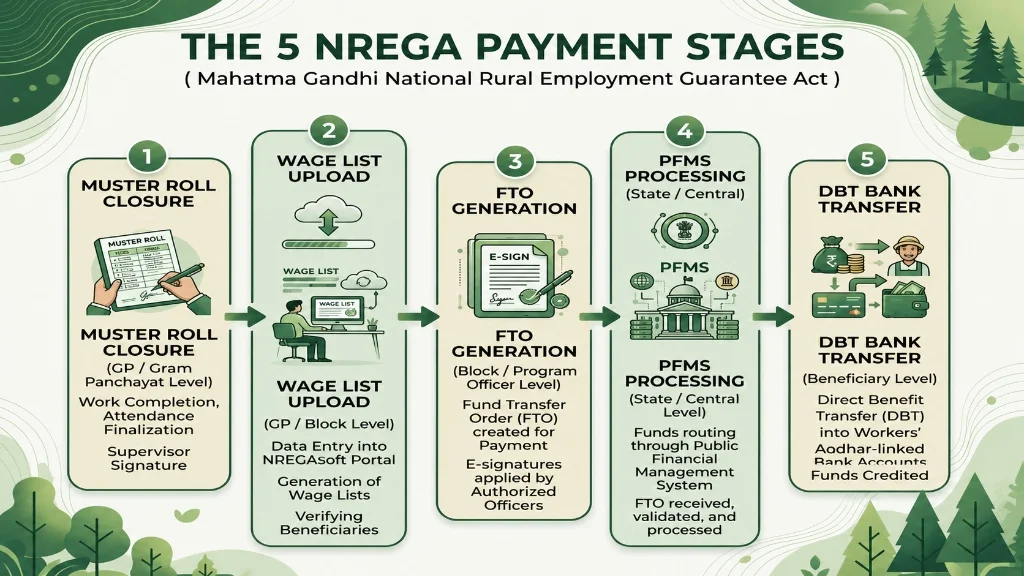
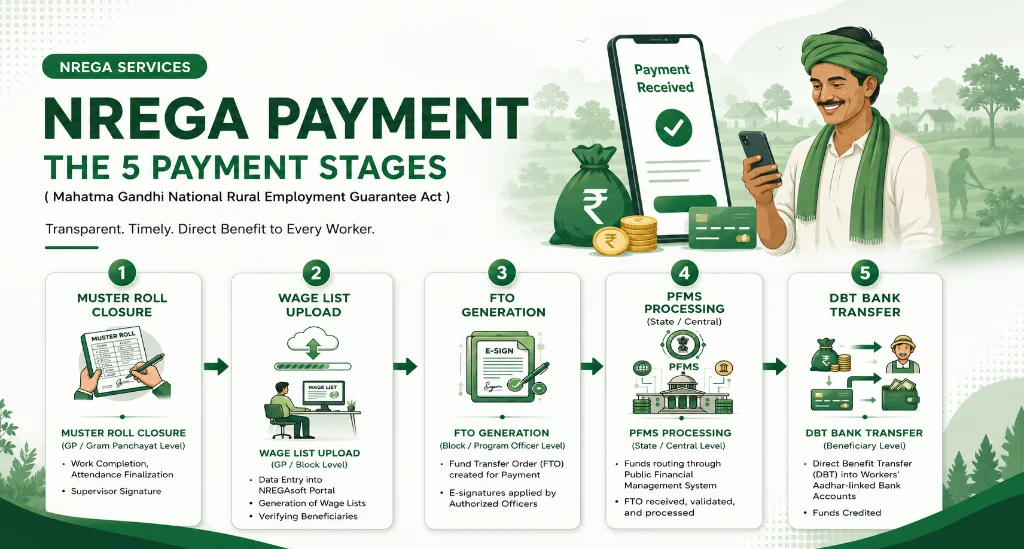
The electronic transfer system ensures that payments are credited directly to your bank account, minimizing delays and official interference. This system operates through the Electronic Fund Management System, which digitizes every payment step. Understanding how these transactions are processed helps you identify where a delay is occurring. The process follows several distinct administrative stages:
First, the site supervisor closes the muster roll, uploading attendance to the central database. Second, block officials verify these logs to generate a wage list containing worker details, days worked, and wages due based on state rates. Third, local Panchayat and block officers authorize this list to generate a Fund Transfer Order (FTO), instructing the bank to release payment.
Once generated, the FTO is sent to the Public Financial Management System (PFMS). The PFMS verifies account details and processes payments using Direct Benefit Transfer (DBT). Verified funds are credited directly to your Aadhaar-linked bank account within 10 to 15 days from muster roll closure.
The electronic transfer relies on a two-step digital signature verification. The first sign-off is completed at the Gram Panchayat level to confirm work execution. The second is done at the block level, confirming that funds are available in the state-pooled account before transmitting the files to the processing bank.
If any step is delayed, the FTO remains pending. Workers can monitor this status by checking the FTO progress report in the portal’s financial section, which shows whether wages are held up by Panchayat signatures, block verification, or bank clearance networks.
What is an FTO Transaction?
A Fund Transfer Order is a digital document that contains payment details for a group of workers. It includes your name, bank name, account number, IFSC code, and the total payment amount. Each FTO is assigned a unique tracking number. By checking this FTO number in your transaction details, you can track whether the payment instruction has been sent to the bank or if it is still pending at the block office.
FTO tracking helps workers verify that their payments have passed the local administrative stage. When you paste the FTO code into the tracking tool, the system shows the processing timestamp at the sponsor bank, the response from the destination bank, and the final payment status. If the FTO shows as processed, it means the bank has successfully received the instruction to transfer funds to your linked account.
For video assistance, watch this step-by-step guide explaining the payment status verification process in detail:
Watching this video walk-through clarifies the parameters entry and database lookup steps on the portal. It highlights common navigation errors and provides visual tips to check your status without requiring an administrative login.
How Many Days Does it Take for NREGA Payment to Come?
According to the Act, workers must receive their payment within 15 days of completing work. The digital e-FMS workflow is designed to meet this timeline. However, technical processing times at the PFMS level or delayed attendance uploads by the local GRS can extend this period. If your payment does not arrive within 15 days, the state is legally required to pay compensation for the delay.
While the official guidelines target a 15-day clearance window, the actual time can vary depending on state-level fund allocations. During periods of high demand, state-pooled accounts may experience temporary deficits, causing FTOs to remain pending on the server. Workers can verify if a delay is due to funding constraints by checking the central balance sheets published in the reports section of the website.
NREGA Payment & Wage Calculator
To help you estimate your upcoming payouts and assess potential transaction risks, we have integrated a payment calculator below. Select your state to populate its official daily wage rate, enter the number of days you worked, and choose your attendance status. The tool will calculate your total estimated earnings and check if your Fund Transfer Order is at risk of delay.
NREGA Payment & Risk Calculator
Estimate your total earnings and check your FTO payment risk instantly.
Your attendance is fully updated via NMMS. Payment will be credited within 15 days.
Why Your NREGA Payment Might Be Delayed (And How to Fix It)
Even though the payment system is automated, delays can occur due to database mismatches or administrative issues. Knowing the common causes allows you to take quick action to resolve them, including the following primary issues:
A primary cause of delay is the Aadhaar Based Payment System (ABPS). Your Aadhaar must be seeded into your job card and bank account, and active on the NPCI mapper. Mismatches in name spelling or incomplete seeding will cause DBT transfers to fail. To resolve this, verify your Aadhaar status at your bank and ensure the mapper link is active.
Another issue is a dormant bank account. Accounts inactive for several months block incoming DBT transfers, requiring a KYC update and small deposit to reactivate. Additionally, if worksite supervisors fail to upload NMMS attendance logs on time, wage list generation is delayed. Check with your GRS to ensure daily logs are synced.
Furthermore, bank mergers in rural areas have changed many IFSC codes. If the database contains old details, the clearing house rejects the payment. Workers must update their passbook details in the system to prevent routing failures, which can be verified on the GP report screen.
Critical Verification Action: If you experience recurring payment delays, check your Aadhaar link status first. You can check this online on the UIDAI portal or by visiting a local bank branch. Resolving mapper issues is essential to resume receiving direct benefit payments.
Job Card Aadhaar Link & ABPS Issues
The transition to the Aadhaar Based Payment System has made Aadhaar mapping mandatory. If your card status shows that ABPS is inactive, the central server will block FTO generation. You must submit a copy of your Aadhaar card and job card to the Gram Panchayat secretary to complete the digital linking process and update the master database.
To verify if your account is ready for ABPS transfers, you can query the NPCI status page online. This tool displays the date of mapping and the specific bank name linked to your Aadhaar. If the status is inactive or linked to an old account, you must file a consent form at your active bank branch to redirect future wage transfers to your current account.
Rejected FTOs and Dormant Bank Accounts
When the PFMS attempts to credit funds, the transaction will fail if the target bank account is blocked, frozen, or closed. The system logs these as “Rejected FTOs” and lists the specific failure reason. If your FTO is rejected, you must resolve the bank block before the block office can generate a new FTO to resend your wages.
Common rejection reasons include frozen accounts due to lack of fresh KYC documents or invalid accounts caused by incorrect details in the GRS entry. Once you correct the account details with the Panchayat secretary, the block development team will flag the transaction for re-generation, allowing the system to send the pending funds in the next weekly cycle.
Missing NMMS Attendance Records
National Mobile Monitoring System app logs are uploaded daily from the worksite. If the supervisor misses uploading these photographs or logs due to poor network coverage, your attendance will appear blank in the weekly muster roll. This halts the wage list generation for that worksite until a manual correction is authorized by the block development officer.
To prevent this issue, supervisors are advised to capture attendance photos in offline mode when network coverage is weak. The app will save the data locally and sync it automatically once the device enters a network zone. Workers can check their daily attendance records online to verify that their presence is logged correctly before the weekly roll closes.
What to Do If Your NREGA Payment Fails or is Rejected?
If your profile shows a transaction failure, you must take active steps. Rejected FTOs remain suspended until manual updates are made. Follow these guidelines to resolve payment failures:
Check the Error Code & Verification
Check the error code in the status column of your payment table (e.g., “Aadhaar Not Seeded” or “Account Dormant”). If the issue is bank-related, visit your branch immediately to submit KYC documents and check Aadhaar mapping status.
Submit Correction Form to GP
If there is a spelling mismatch or incorrect account number in the database, submit a correction form with passbook and Aadhaar copies to the GP secretary. Once updated, block officials will regenerate the FTO to credit your pending wages.
Obtain Transaction Proof
Obtain a printout of the rejected transaction screen as proof when visiting the bank or GP office. Once the bank resolves the issue, request written confirmation that your account is ready for DBT transfers.
Present Confirmation to Panchayat
Present this confirmation to the local Panchayat office so the GRS can update your status, allowing the system to automatically route your pending wages in the next FTO cycle.
The Unemployment Allowance Rule
Guaranteed Rights Under the NREGA Act: The Act provides legal protections to ensure that rural households receive timely employment and wages. Under the law, if the Gram Panchayat fails to allocate work within 15 days of receiving your work application, you are legally entitled to receive a daily Unemployment Allowance. The state government must pay this allowance using its state funds.
1. Work Allocation Delay
If work is not allocated within 15 days of applying, you get an unemployment allowance: at least one-fourth of the standard wage rate for the first 30 days, and one-half of the rate for subsequent days.
2. Payment Disbursement Delay
If wages are not paid within 15 days of muster roll closure, delay compensation is paid at the rate of 0.05 percent of the pending wages for each day of delay.
To claim this compensation or the unemployment allowance, you must submit a written application to the Block Development Officer. The officer will verify the records and credit the allowance directly to your bank account. If the block office refuses to process your allowance application, you can escalate the matter by filing a complaint with the district program coordinator.
In addition to the allowance, local Panchayats are required to conduct regular social audits of all developmental works. During these audits, wage registers, muster rolls, and payment slips are reviewed in public meetings to ensure transparency. Participating in these audits gives workers a direct platform to raise issues regarding unpaid wages or unauthorized deductions.
State-Wise NREGA Payment Details & Trackers (2026-27)
While the national portal houses the central database, individual states maintain dedicated query servers to help citizens check their localized reports quickly. Using these state-specific servers avoids timeouts during peak hours. The table below lists the primary states, their regional codes, and the official tracking methods to verify your payment files:
| State Name | State Code | Sample Transaction Prefix |
|---|---|---|
| Andhra Pradesh | AP | AP-03-PAYMENT… |
| Bihar | BR | BR-06-PAYMENT… |
| Chhattisgarh | CG | CG-08-PAYMENT… |
| Gujarat | GJ | GJ-12-PAYMENT… |
| Haryana | HR | HR-13-PAYMENT… |
| Jharkhand | JH | JH-16-PAYMENT… |
| Madhya Pradesh | MP | MP-21-PAYMENT… |
| Maharashtra | MH | MH-22-PAYMENT… |
| Rajasthan | RJ | RJ-30-PAYMENT… |
| Uttar Pradesh | UP | UP-35-PAYMENT… |
| West Bengal | WB | WB-37-PAYMENT… |
To use these regional trackers, navigate to the specific state portal, enter your District and Block parameters, and search for your village directory. Utilizing state-specific servers provides faster query responses during peak traffic times, allowing you to download wage slips and check pending transaction listings easily.
State-specific servers are especially useful during high-traffic periods, such as when new financial allocations are released. Some states, like Rajasthan and Andhra Pradesh, have integrated their local servers with mobile applications, allowing workers to receive real-time notifications on their phones when an FTO is approved. Checking these local systems helps you stay informed of your financial status without having to visit the block office.
Furthermore, states may offer localized grievance portals to resolve payment disputes. If your payment is held up at the state level due to budget constraints, these portals allow you to submit tracking inquiries directly to the state department. Using these state-level communication channels ensures that your queries are addressed by officers who manage the local distribution of funds.
Impact of VB-G RAM G Transition on FTOs
Database Migration Warning: As the system migrates to the new VB-G RAM G database, you may experience delays in FTO generation. Existing ABPS and Aadhaar links will carry over automatically, but new FTOs might take an additional 3-5 days to process during the 6-month transition period.
The transition to the new VB-G RAM G Act introduces a massive ₹95,692 Crore budget to support the expanded 125-day work guarantee. This requires a major overhaul of the financial backend. During this time, state and central servers are being upgraded, which may result in temporary “DB-ERROR” messages on the FTO tracking page.
Rest assured, all your logged workdays are safely recorded. Once the transition stabilizes, the new system is designed to process payments significantly faster than the legacy MGNREGA system. If your FTO shows as “Pending” for longer than usual, please allow a few extra days before filing a grievance.
Frequently Asked Questions (FAQs)
1. Will I get paid my NREGA wages in cash?
2. How are wages calculated if I only worked half a day?
3. What is the minimum wage for NREGA in 2026?
4. How can I check if my job card aadhar link is active?
5. How do I track a specific FTO transaction?
Related Guide: Troubleshooting Pending Wages
Additionally, you can contact the national toll-free helpline or submit a grievance form directly on the portal if your local officials fail to process updates. Under the social audit guidelines, local Panchayat records must be open for review, ensuring complete transparency for every rural worker. Navigating the system using these resources ensures you stay informed of your employment records and check your payments online at the official portal: nrega.nic.in.